Twitter tag #sflive2011:
https://twitter.com/#!/search?q=%23sflive2011
Slides for the first presentation of the day, The Path to Symfony in the USA:
http://www.slideshare.net/dustin.whittle/the-path-to-symfony-in-the-usa
Symfony2 bundle repository:
http://www.symfony2bundles.org/
Symfony Questions / Anwers :
http://symfonyexperts.com/
Apostrophe presentation:
http://www.slideshare.net/tompunk/apostrophe-6853364
Symfony Live blogging:
http://window.punkave.com/2011/02/08/liveblogging-symfony-live/
Doctine in the real world (opensky) :
http://www.slideshare.net/jwage/doctrine-intherealworldsf-live2011sanfran
phpBB4 building end user applications with Symfony2:
http://prezi.com/gxrdwsplwplf/phpbb4-building-end-user-applications-with-symfony2/
Tuesday, February 08, 2011

Monday, August 30, 2010
PHP 5.3.3 short tags problem when upgrading
Recently after upgrading php to 5.3.3 I found a problem with short tags <?= and <? , it seems that you now must only use <?php as starting tag, and all my code with <?= was not processed by php.
Short tags looks nicer and cleaner but can be a problem for people using XML, find more info here:
http://wiki.php.net/rfc/shortags
Here is a useful command if you need to replace this tags in your old code:
Short tags looks nicer and cleaner but can be a problem for people using XML, find more info here:
http://wiki.php.net/rfc/shortags
Here is a useful command if you need to replace this tags in your old code:
grep -oiR '<?=' /path/to/dir | cut -d ":" -f 1 | xargs sed -i 's/<?=/<?php echo /g'
Thursday, September 03, 2009
How to resize or scale a list of images on linux
Here is a simple but powerful command when you got several images that you want to shrink:
This will reduce all the images by 50%
Or if you just want to reduce one image to 200x200 pixels for example:
mogrify -scale 50% *.jpg
This will reduce all the images by 50%
Or if you just want to reduce one image to 200x200 pixels for example:
convert -scale 200x200 image.jpg image_small.jpg
Friday, August 21, 2009
Installing virtualbox on Ubuntu 9.04
# virtualbox
WARNING: The character device /dev/vboxdrv does not exist.
   Please install the virtualbox-ose-source package and the appropriate
   headers, most likely  linux-headers-generic.

   You will not be able to start VMs until this problem is fixed.
root@ubuntu-laptop:/home/camafla# apt-get install linux-headers-server
Reading package lists... Done
Building dependency tree
Reading state information... Done
The following extra packages will be installed:
linux-headers-2.6.28-11-server
The following NEW packages will be installed:
linux-headers-2.6.28-11-server linux-headers-server
0 upgraded, 2 newly installed, 0 to remove and 0 not upgraded.
Need to get 672kB of archives.
After this operation, 8139kB of additional disk space will be used.
Do you want to continue [Y/n]? y
Get:1 http://archive.ubuntu.com jaunty/main linux-headers-2.6.28-11-server 2.6.28-11.42 [669kB]
Get:2 http://archive.ubuntu.com jaunty/main linux-headers-server 2.6.28.11.15 [3388B]
Fetched 672kB in 6s (104kB/s)
Selecting previously deselected package linux-headers-2.6.28-11-server.
(Reading database ... 157949 files and directories currently installed.)
Unpacking linux-headers-2.6.28-11-server (from .../linux-headers-2.6.28-11-server_2.6.28-11.42_i386.deb) ...
Selecting previously deselected package linux-headers-server.
Unpacking linux-headers-server (from .../linux-headers-server_2.6.28.11.15_i386.deb) ...
Setting up linux-headers-2.6.28-11-server (2.6.28-11.42) ...
Examining /etc/kernel/header_postinst.d.
run-parts: executing /etc/kernel/header_postinst.d/dkms
* Running DKMS auto installation service for kernel 2.6.28-11-server
*  vboxdrv (2.1.4)...                                                          vboxdrv (2.1.4): Installing module.
.............
......
                                                                       [ OK ]
*  vboxnetflt (2.1.4)...                                                       vboxnetflt (2.1.4): Installing module.
............
......
                                                                       [ OK ]
run-parts: executing /etc/kernel/header_postinst.d/nvidia-common

Setting up linux-headers-server (2.6.28.11.15) ...
Monday, June 08, 2009
LPI 102 exam reference card (or cheat sheet if you like)

I recently cleared the LPIC-1 certification (LPI certification Level 1) , as an educational exercise to study for my second exam (exam 102) I created a reference card that helped me remember some commands and key concepts for the exam.
I want to share this to anyone interested in taking this exam or just anyone who wants a quick linux reference card to the objectives included in the exam.
Download
PNG version: lpi-102-reference-card-v1.png

PDF version: lpi-102-reference-card-v1.pdf
Wednesday, January 28, 2009
Installing Oracle OCI8 and PHP
I will describe here the steps I needed to install oracle connectivity for php. It's supposed you have php installed, in my case
I had php 5.1.6 throught RPM:
Distro:
1. Download and install the Instant Client rpms from oracle which you can get here http://www.oracle.com/technology/tech/oci/instantclient/instantclient.html.
This are the two files needed in my case:
2. Compile and install the oci8 extension:
Make sure you have the proper packages to compile a script like: php-devel, gcc,etc.
I used pear install pecl/oci8 instead of pear install oci8 because for some reason the second one returns an out of memory error and ignores the memory limit variable (memory_limit = XX ) from the
php.ini file.
When asked about this:
Please provide the path to the ORACLE_HOME directory. Use 'instantclient,/path/to/instant/client/lib' if you're compiling with Oracle Instant Client : autodetect
If you have oracle installed in the same server just hit enter. If not (you just want to connect to another server) type:
instantclient and enter or the path to the oracle libraries e.g: /usr/lib/oracle/11.1/client64/lib/.
3. Finally, edit your php.ini file (/etc/php.ini) and add the extension=oci8.so in the Dynamic extensions section. Don't forget to restart apache so the changes take effect in apache.
Additional information can be found here: http://www.oracle.com/technology/pub/notes/technote_php_instant.html.
I had php 5.1.6 throught RPM:
# rpm -qa  | grep php
php-5.1.6-20.el5_2.1
php-adodb-4.81-1.el5.rf
php-pecl-mailparse-2.1.1-1.el5.rf
phpmyadmin-2.11.8.1-1.el5.rf
php-odbc-5.1.6-20.el5_2.1
php-pecl-fileinfo-1.0.4-1.el5.rf
php-cli-5.1.6-20.el5_2.1
php-pear-file-1.2.2-1.el5.rf
php-eaccelerator-5.1.6_0.9.5.2-4.el5.rf
php-pecl-memcache-2.1.2-1.el5.rf
php-pear-db-1.7.13-2.el5.rf
php-common-5.1.6-20.el5_2.1
Distro:
# cat /etc/redhat-release
Red Hat Enterprise Linux Server release 5 (Tikanga)
1. Download and install the Instant Client rpms from oracle which you can get here http://www.oracle.com/technology/tech/oci/instantclient/instantclient.html.
This are the two files needed in my case:
# rpm -ivh oracle-instantclient11.1-basic-11.1.0.7.0-1.x86_64.rpm

# rpm -ivh oracle-instantclient11.1-devel-11.1.0.7.0-1.x86_64.rpm
2. Compile and install the oci8 extension:
Make sure you have the proper packages to compile a script like: php-devel, gcc,etc.
# pear install pecl/oci8
I used pear install pecl/oci8 instead of pear install oci8 because for some reason the second one returns an out of memory error and ignores the memory limit variable (memory_limit = XX ) from the
php.ini file.
When asked about this:
Please provide the path to the ORACLE_HOME directory. Use 'instantclient,/path/to/instant/client/lib' if you're compiling with Oracle Instant Client : autodetect
If you have oracle installed in the same server just hit enter. If not (you just want to connect to another server) type:
instantclient and enter or the path to the oracle libraries e.g: /usr/lib/oracle/11.1/client64/lib/.
3. Finally, edit your php.ini file (/etc/php.ini) and add the extension=oci8.so in the Dynamic extensions section. Don't forget to restart apache so the changes take effect in apache.
Additional information can be found here: http://www.oracle.com/technology/pub/notes/technote_php_instant.html.
Wednesday, September 10, 2008
How to solve no sound in flash videos ( fedora )
After installing flash-plugin-9.0.124.0-release.i386 rpm I just got the flash plugin in my firefox but didn't get any sound. Googling about it I found a solution that worked, you need to install libflashsupport rpm, restart firefox and that's it:
just type this:
I guess this may work in other red hat based distros.
just type this:
yum install libflashsupport
I guess this may work in other red hat based distros.
Monday, September 08, 2008
PHP Fatal error: Class 'DomDocument' not found in ...
After running symfony propel-build-all on a new symfony installation got this error. The solution is to install the php-xml rpm (deb).
[root@devel2 cms]# symfony propel-build-all
>> schema converting "/home/sfprojects/cm...lugin/config/schema.yml" to XML
>> schema putting /home/sfprojects/cms/pl...erated-sfGuardPlugin-schema.xml
>> file+ config/generated-sfGuardPlugin-schema.xml
>> file- /home/sfprojects/cms/plugins/sf...erated-sfGuardPlugin-schema.xml
Buildfile: /usr/share/pear/symfony/vendor/propel-generator/build.xml
[resolvepath] Resolved /home/sfprojects/cms/config to /home/sfprojects/cms/config
propel-project-builder > check-project-or-dir-set:
propel-project-builder > check-project-set:
propel-project-builder > set-project-dir:
propel-project-builder > check-buildprops-exists:
propel-project-builder > check-buildprops-for-propel-gen:
propel-project-builder > check-buildprops:
propel-project-builder > configure:
[echo] Loading project-specific props from /home/sfprojects/cms/config/propel.ini
[property] Loading /home/sfprojects/cms/config/propel.ini
propel-project-builder > om:
[phing] Calling Buildfile '/usr/share/pear/symfony/vendor/propel-generator/build-propel.xml' with target 'om'
[property] Loading /usr/share/pear/symfony/vendor/propel-generator/./default.properties
propel > check-run-only-on-schema-change:
propel > om-check:
propel > om:
[echo] +------------------------------------------+
[echo] | |
[echo] | Generating Peer-based Object Model for |
[echo] | YOUR Propel project! (NEW OM BUILDERS)! |
[echo] | |
[echo] +------------------------------------------+
[phingcall] Calling Buildfile '/usr/share/pear/symfony/vendor/propel-generator/build-propel.xml' with target 'om-template'
[property] Loading /usr/share/pear/symfony/vendor/propel-generator/./default.properties
propel > om-template:
[propel-om] Target database type: mysql
[propel-om] Target package: lib.model
[propel-om] Using template path: /usr/share/pear/symfony/vendor/propel-generator/templates
[propel-om] Output directory: /home/sfprojects/cms
[propel-om] Processing: schema.xml
PHP Fatal error: Class 'DomDocument' not found in /usr/share/pear/symfony/vendor/propel-generator/classes/propel/phing/AbstractPropelDataModelTask.php on line 406
[root@devel2 cms]# symfony propel-build-all
>> schema converting "/home/sfprojects/cm...lugin/config/schema.yml" to XML
>> schema putting /home/sfprojects/cms/pl...erated-sfGuardPlugin-schema.xml
>> file+ config/generated-sfGuardPlugin-schema.xml
>> file- /home/sfprojects/cms/plugins/sf...erated-sfGuardPlugin-schema.xml
Buildfile: /usr/share/pear/symfony/vendor/propel-generator/build.xml
[resolvepath] Resolved /home/sfprojects/cms/config to /home/sfprojects/cms/config
propel-project-builder > check-project-or-dir-set:
propel-project-builder > check-project-set:
propel-project-builder > set-project-dir:
propel-project-builder > check-buildprops-exists:
propel-project-builder > check-buildprops-for-propel-gen:
propel-project-builder > check-buildprops:
propel-project-builder > configure:
[echo] Loading project-specific props from /home/sfprojects/cms/config/propel.ini
[property] Loading /home/sfprojects/cms/config/propel.ini
propel-project-builder > om:
[phing] Calling Buildfile '/usr/share/pear/symfony/vendor/propel-generator/build-propel.xml' with target 'om'
[property] Loading /usr/share/pear/symfony/vendor/propel-generator/./default.properties
propel > check-run-only-on-schema-change:
propel > om-check:
propel > om:
[echo] +------------------------------------------+
[echo] | |
[echo] | Generating Peer-based Object Model for |
[echo] | YOUR Propel project! (NEW OM BUILDERS)! |
[echo] | |
[echo] +------------------------------------------+
[phingcall] Calling Buildfile '/usr/share/pear/symfony/vendor/propel-generator/build-propel.xml' with target 'om-template'
[property] Loading /usr/share/pear/symfony/vendor/propel-generator/./default.properties
propel > om-template:
[propel-om] Target database type: mysql
[propel-om] Target package: lib.model
[propel-om] Using template path: /usr/share/pear/symfony/vendor/propel-generator/templates
[propel-om] Output directory: /home/sfprojects/cms
[propel-om] Processing: schema.xml
PHP Fatal error: Class 'DomDocument' not found in /usr/share/pear/symfony/vendor/propel-generator/classes/propel/phing/AbstractPropelDataModelTask.php on line 406
Saturday, June 21, 2008
Mplayer crashes using beryl compiz-fusion
When you start to use compiz-fusion and all the fancy desktop effects you will notice a little problem, you can't watch videos!. There's a bug that crashes mplayer, totem and all your video players. Hopefully there's a workaround for mplayer (not sure how to solve the problem with totem).
1. Open mplayer.
2. Right click over the window.
3. Click on preferences.
4. Click on the Video tab .
5. Change the video driver from Xv to X11 and click Ok.
You may have to restart mplayer to see the changes.
1. Open mplayer.
2. Right click over the window.
3. Click on preferences.
4. Click on the Video tab .
5. Change the video driver from Xv to X11 and click Ok.
You may have to restart mplayer to see the changes.
Wednesday, June 18, 2008
Vista Blue Screen of Death: STOP: 0x0000008E

The famous blue screen of death attacked me again (previous bsod), this time on Vista, on my Dell inspiron 1520. It's very annoying that you have to deal with this kind of errors on a laptop recently bought. This error started to display a few seconds after logging in to the user account and with no clear reason of what could be the trigger of the error.
The solution this time actually had nothing to do (directly) with Windows Vista but with the laptop BIOS, and the solution came from the dell support site support.dell.com, the error itself suggested to update the BIOS , but I don't pay too much attention to this general error messages. If you're having this same problem you could go and follow this check list from dell, the BIOS upgrade was the second suggestion for a BSOF error and this was the one that worked for me, the file to do this is in the "Drivers and Downloads" section and you can select between all the different models.
Subversion: MKCOL of '...' 405 Method Not Allowed
I was messing with the .svn/entries file in one of my local working copy folders, also I rm -rf a folder and regenerated again (I'm using symfony admin generator) , long story, but the fact is that I think I screwed up something and started to get this error when trying to commit:
# svn commit -m "backend modifications"
Adding apps/backend/modules/comment
svn: Commit failed (details follow):
svn: MKCOL of '/projects/cms/!svn/wrk/5ca09002-f34f-0410-890e-9511925f86a5/trunk/apps/backend/modules/comment': 405 Method Not Allowed (http://svn.calipso.com.co)
After some googling, I found it could be some proxy problem, but I wasn't using a proxy. Later I found that this error could mean that
the directory already existed in the repository and couldn't be recreated again, so my next step was to delete the folder from the repository (svn del ...) and try to do a fresh commit after recreating the folder and files included in it, and this worked ;).
I hope this helps some lost soul out there.
# svn commit -m "backend modifications"
Adding apps/backend/modules/comment
svn: Commit failed (details follow):
svn: MKCOL of '/projects/cms/!svn/wrk/5ca09002-f34f-0410-890e-9511925f86a5/trunk/apps/backend/modules/comment': 405 Method Not Allowed (http://svn.calipso.com.co)
After some googling, I found it could be some proxy problem, but I wasn't using a proxy. Later I found that this error could mean that
the directory already existed in the repository and couldn't be recreated again, so my next step was to delete the folder from the repository (svn del ...) and try to do a fresh commit after recreating the folder and files included in it, and this worked ;).
I hope this helps some lost soul out there.
Thursday, May 22, 2008
Unable to write config cache for "config/config_handlers.yml"
After upgrading to symfony version 1.0.16 from 1.0.8 I started to get this error:
Unable to write config cache for "config/config_handlers.yml"
I tried to chmod 777 the cache and it didn't work. The solution for me was to disable SELinux.
How to do that? edit your /etc/sysconfig/selinux file, and set SELINUX=disabled:
Unable to write config cache for "config/config_handlers.yml"
I tried to chmod 777 the cache and it didn't work. The solution for me was to disable SELinux.
How to do that? edit your /etc/sysconfig/selinux file, and set SELINUX=disabled:
# This file controls the state of SELinux on the system.
# SELINUX= can take one of these three values:
#       enforcinfg - SELinux security policy is enforced.
#       permissive - SELinux prints warnings instead of enforcing.
#       disabled - No SELinux policy is loaded.
SELINUX=disabled
Thursday, February 21, 2008
Page redirection in php with header('Location...') : Blank page vs Working redirection
This kind of errors are what make debugging sometimes a very frustrating part of the developement, if you're suffering a blank page when trying to make a header('Location..'), give this a try:
This is a good redirection:
And this is a wrong redirection:
Notice a space between 'Location' and ':' this makes the redirection not to work!!!!
Simple errors likes this consume a lot of time :( , hope helps someone else...
This is a good redirection:
header('Location: http://www.example.com/');
exit();
?>
And this is a wrong redirection:
header('Location : http://www.example.com/');
exit();
?>
Notice a space between 'Location' and ':' this makes the redirection not to work!!!!
Simple errors likes this consume a lot of time :( , hope helps someone else...
Monday, February 11, 2008
.htaccess: order not allowed here
I was getting an 500 Internal Server Error when trying to access Drupal after installing it, when I checked the http error log it said : .htaccess: order not allowed here.
After adding this to the httpd.conf and restarted apache it worked:
change "/home/httpd/html/drupal" to wherever your document root is.
After adding this to the httpd.conf and restarted apache it worked:
< directory "/home/httpd/html/drupal" >
AllowOverride FileInfo Limit Options Indexes
< /directory >
change "/home/httpd/html/drupal" to wherever your document root is.
Friday, February 08, 2008
Apache Error: No space left on device
Apache doesn't start and the error log contains:
After checking your disk it shows that you have plenty of space. The problem is that apache didn't shut down properly, and it's left myriads of semaphore-arrays left, owned by 'apache' user.
Run:
Removing these semaphores immediately should solve the problem and allow apache to start.
where 'apache' is the owner of the apache process, if that's not the name of the user on your server change it.
[emerg] (28)No space left on device: Couldn't create accept lock
or
[crit] (28)No space left on device: mod_rewrite: could not create rewrite_log_lock Configuration Failed
After checking your disk it shows that you have plenty of space. The problem is that apache didn't shut down properly, and it's left myriads of semaphore-arrays left, owned by 'apache' user.
Run:
ipcs -s | grep apache
Removing these semaphores immediately should solve the problem and allow apache to start.
ipcs -s | grep apache | perl -e 'while () { @a=split(/\s+/); print `ipcrm sem $a[1]`}'
where 'apache' is the owner of the apache process, if that's not the name of the user on your server change it.
How to check running queries and stats in postgres ?
You want to know what query is slowing the database or want to check what's going on with a query you
just run, well in mysql just need to type 'show processlist;', but in postgres you must enable two variables
to check this and other stats.
Edit your postgres.conf which should be on /var/lib/pgsql/data/postgresql.conf for *nix installations and add or change this:
This must be set to true for the statistics collector to be launched at all.
This enables monitoring of the current command being executed by any server process. The statistics collector subprocess need not be running to enable this feature.
After restarting postgres the following query will show currently running queries
only as user "postgres"
just run, well in mysql just need to type 'show processlist;', but in postgres you must enable two variables
to check this and other stats.
Edit your postgres.conf which should be on /var/lib/pgsql/data/postgresql.conf for *nix installations and add or change this:
stats_start_collector = true
This must be set to true for the statistics collector to be launched at all.
stats_command_string = true
This enables monitoring of the current command being executed by any server process. The statistics collector subprocess need not be running to enable this feature.
After restarting postgres the following query will show currently running queries
/etc/init.d/postgresql restart


psql -U postgres template1 -c "select * from pg_stat_activity"
only as user "postgres"
Monday, December 03, 2007
How to create a DSL connection on ubuntu
If your router/modem is set in bridge mode and you need to dial to make a connection you must use pppoE (Point to Point Protocol Over Ethernet) it's similar to the usual modem dial-up connection, but the difference is that you use the network an not the land line to connect.
In ubuntu you can run a little script called:
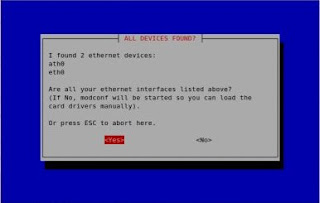
Just accept the defaults an make sure you give the right username/password.
it will edit this file:
Now to create a connection use:
"dsl-provider" is name I chose for the connection which is the default
And to stop a connection use:
To stop all processes:
You can check the log using this commmand:
In ubuntu you can run a little script called:
# pppoeconf

Just accept the defaults an make sure you give the right username/password.
it will edit this file:
# cat /etc/ppp/peers/dsl-provider

# Minimalistic default options file for DSL/PPPoE connections

noipdefault
defaultroute
replacedefaultroute
hide-password
#lcp-echo-interval 30
#lcp-echo-failure 4
noauth
persist
#mtu 1492
usepeerdns
plugin rp-pppoe.so
nic-ath0
user "xxxxxxxxxxx"
Now to create a connection use:
# pon dsl-provider

Plugin rp-pppoe.so loaded.
"dsl-provider" is name I chose for the connection which is the default
And to stop a connection use:
# poff
To stop all processes:
# poff -a
You can check the log using this commmand:
# plog
pppd[3928] : pppd 2.4.4 started by root, uid 0
Wednesday, September 19, 2007
My Firefox Toolbars are blank !
For some unknown reason my web developer and delicious firefox toobars disappeared, I could see the space where they used to be but no icons or anything was there. I tried with the view toolbars menu , checking and unchecking to hide and show them, but that didn't work. Finally I found the solution, firefox have an option called firefox safemode http://kb.mozillazine.org/Safe_mode which allows us to troubleshoot some problems (like this one), all you have to do is:
1. Close any running intance of firefox.
2. Type this command :
For more info for different OSs check here
3. Then check the box for "Reset toolbars and controls"
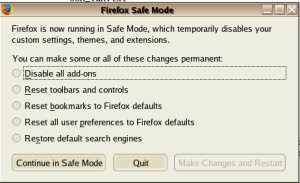
4. Click on "Make changes and restart"
That's it... your toolbar icons should appear again.
1. Close any running intance of firefox.
2. Type this command :
firefox -safe-mode
For more info for different OSs check here
3. Then check the box for "Reset toolbars and controls"

4. Click on "Make changes and restart"
That's it... your toolbar icons should appear again.
Wednesday, September 05, 2007
Oditt.com: web 2.0 for podcast episodes
Oditt it's a community-based site focused on ranking podcast episodes. It's very useful if you want to find specific podcast episodes about very narrow subjects, you can use tags, categories, or just keywords. Also, you can find RSS feeds for tags, categories, popular and recent episodes.
Check some oracle episodes here: http://www.oditt.com/tag/oracle.
Check some oracle episodes here: http://www.oditt.com/tag/oracle.
Friday, June 01, 2007
Beryl keyboard and mouse shortcuts
Here are some default beryl shortcuts:
Ctrl + Alt + Drag the mouse : rotate the cube to any direction in the space.
Ctrl + left/right arrow key : rotate the cube to the left or right direction
Windows key + Pause : shows the window thumbnails or also called window picker , you can also place the mouse in the top right corner for the same action.
Remember that any shortcut can be changed in the beryl manager.
Ctrl + Alt + Drag the mouse : rotate the cube to any direction in the space.
Ctrl + left/right arrow key : rotate the cube to the left or right direction
Windows key + Pause : shows the window thumbnails or also called window picker , you can also place the mouse in the top right corner for the same action.
Remember that any shortcut can be changed in the beryl manager.
Subscribe to:
Posts (Atom)