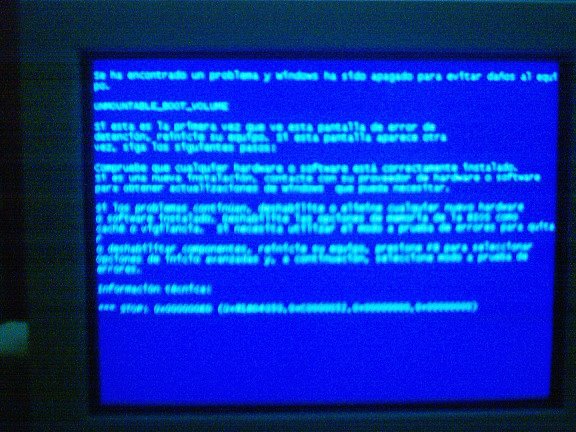
Why me?, i started to think about what i have done to this occur, i checked my IDE cables, boot again and again (safe mode, last known... bla, bla) hoping to fix it alone but nothing works, so before kicking the pc or format it , i tried booting with a win XP cd and in the recovery console (pressing "R", then choosing "c:/windows", and finally entering the administrator password) i typed this:
1. chksdsk /r [enter] --> it takes a long time
2. chksdsk /p [enter]
3. fixboot c: [enter] -->if c: is where windows is installed
4. exit ->to reboot again
And it works, i got xp back again :P.
I have the same problem, with a laptop 8600 xp home addition. I at the moment proceeding with the solutions you have provided, being highly optimistic about ti, hoping will bring back the dead...slow compouet ofc
ReplyDeleteI hope you can fix it without reinstalling xp.
ReplyDeleteI had the same problem with a Compaq Presario 6000 Desktop PC.
ReplyDeleteThat certainly did the trick!
Thanks.
I tried the above and it worked fabulously for me on a Dell Inspiron.
ReplyDeletethanks!
wow... that did it. XP pro on an old e-machine. Thanks, you the man
ReplyDeleteDidn't work for me, It's driving me nuts and my XP Pro doesn't allow me to boot to the prompt to use chkdsk /r, I have since installed Linux and it works like a champ.
ReplyDeleteThat's a good reason to move....
ReplyDeleteWorked for me!
ReplyDeleteThanks a lot, it worked for me (Dell Inspiron 8600)
ReplyDeleteI have the same problem as youguys only I have to put administrator password. Problem is /i don't kno wat it is, and neither does my dad who bought the computer
ReplyDeleteOh man, it worked for me as well. I almost had lost hope..thank you.
ReplyDeleteKapil
damn. the issue i am having is that I cannot type anything when it gives me the "Boot from CD :" prompt. is there any way around that?
ReplyDeleteThank you so much for posting this. For two weeks I had been unable to boot my laptop, but because of your solution, I have now successfully been able to get it up and running again.
ReplyDeleteYou are made of the most absolute win.
Does this fix for the UNMOUNTABLE_BOOT_VOLUME reformat your harddrive? Also will any windows home edition cd be suitable for this or does it need to be a recovery cd for your particular model?
ReplyDeleteNo, it doesn't reformat your drive. Any windows XP installation cd should do the job.
ReplyDeletegood luck
Thanks for the post; I was able to recover from this. I couldn't get in to windows directory, so I just ran dskchk on C:\ I got it breathing again.
ReplyDeleteThanks!
My crash was deeper than that, when I ran the chkdsk command, it checked until about 34% an then this appeared: The volume appears to contain one or more unrecoverable problems.
ReplyDeleteSad..
Same identical problem, same identical solution!!! (all the steps you suggested were absolutely perfect!)
ReplyDeleteThx a lot m8!
man, this is an old post, but a great solution. Thank you so much, saved my ass!
ReplyDeleteEVEN WITH THE RECOVERY DISK IT WILL NOT GET TO THE THAT POINT WHERE I CAN REPAIR OR REFORMAT THE HARD IT JUST LOOKS LIKE WINDOWS IS LOADING AND THEN GOES TO THE BLUE SCREEN. IT THE GOES TO THE PAGE WITH DIFFERENT MODES TO START WITH---I'VE TRIED THEM ALL. WHAT'S NEXT, JUST REPLACE THE HARD DRIVE
ReplyDeletegoogle the error number (that 0x0000XXX) that could give you a general idea of the problem, sometimes is a memory problem...
ReplyDeletebad luck for me.. during chkdsk around 25% this line appeared "The volume appears to contain one or more unrecoverable problems." i had to reformat to solve the puzzle =(
ReplyDeleteWOW I MEAN YOU SAVED MY LIVE! MY WHOLE LIFE PHOTOS DOCUMENTS AND MANY MANY THINGS WERE ON THE DAMAGED PARTITION IF IT WASNT FOR THIS POST I WOULD PROBABLY FORMAT IT! WHO EVER YOU ARE THANK YOU...
ReplyDeleteIt worked!!!
ReplyDeleteThank you so much!!!!
Thank goodness!
ReplyDeleteI slept one night and left my computer to download some files on torrent. When I woke up, my pc kept rebooting over and over and always stopped at the windows bootscreen with a sudden flash of the BSOD. I disabled to caching and finally displaying the BSOD properly, "unmountable_boot_volume." I did the steps, ran ASR, chckdsk /r, chckdsk /p, fixboot, then exit, and re-enabled the cache/shadowing on bios. After that, my windows started working normally again. I almost lost hope and considered reformatting my pc, but you saved me. By the way, I'm running genuine Windows XP Home SP3, and used a pirated Windows XP Pro SP2 cd to boot up to ASR, so the info was right that it didn't matter what XP cd installer you had as long as it was bootable. Again, thank you so much! :D
I'm glad to help you guys ;)
ReplyDeleteWell, it worked for me, without any problems... took it a little while, but worth the wait.
ReplyDeletedoes it work without loosing anything?
ReplyDeleteNo, you don't lose anything, just a few minutes..
ReplyDeleteMy best friends girlfriend had this on her laptop. She was about to take it to the shop and prob waste a good $50-100 to fix it. I tried this and IT WORKED! No data was lost, everything was just as find as before.
ReplyDeleteTHANK YOU!!! xD
(My god was she happy when she jumped all over me and thanking me like crazy... hehe) Only if her boyfriend wasn't a friend... damn.
heheh good for you, maybe next time you can fix a non best friend's girlfriend computer
ReplyDeleteHi
ReplyDeleteI enciountered BSOD in the mornng and i lost all hopes of recovering it...unless i came accross this solution
i followed step by step and i solved the problem
thank you very much.
I guess this is the best solution for BSOD problem!!!
regards
VGM
Thanks, just what I was looking for.
ReplyDeletethank that really helped and it worked!
ReplyDeleteI REALLY hope this works with my laptop. I have a good 2 hours of original recorded music that me and my bass player recorded that I simply cannot lose.
ReplyDeleteYou do not need to separately run a chkdsk /p.
ReplyDeleteIf you use /r, the /p is implied within the command ...
Big UPs, it worked for me too......
ReplyDeleteAfter 4 1/2 years from the original post, this fix worked for me also. Kudos to the original poster!! I would point out that the command is CHKDSK, not CHKSDSK as in original post (at least on my Dell Inspiron B120).
ReplyDeleteWhat if I don't have the windows xp instalation cd?
ReplyDelete